
Sandboxing & Permissions
WASM nodes execute inside Wasmtime rather than as native plugins. That provides memory isolation and lets Flow-Like meter execution and gate host functions. It does not make arbitrary third-party code trustworthy, so Flow-Like also shows a consent prompt before running sideloaded packages.
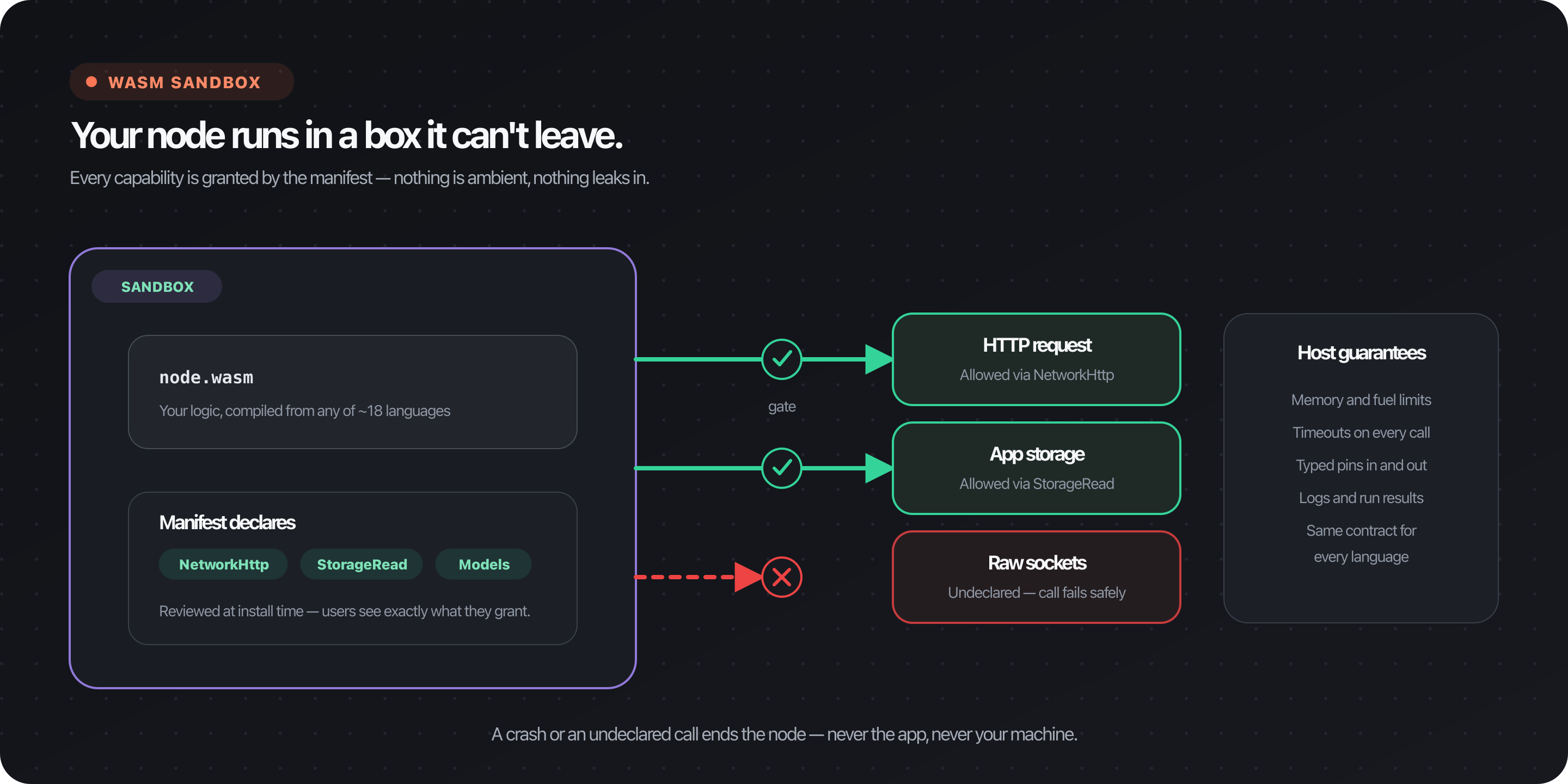
What the sandbox provides
Section titled “What the sandbox provides”| Boundary | Current behavior |
|---|---|
| Linear memory | A module cannot directly address the host process’s memory |
| Filesystem | No host directory is preopened as a general-purpose filesystem; storage access uses Flow-Like host functions |
| Host functions | Variables, cache, storage, streaming, models, OAuth, A2UI, functions, and network operations are capability-checked |
| CPU work | Wasmtime fuel metering bounds instruction use |
| Wall time | Epoch interruption enforces the configured timeout |
| Memory | Store limits apply the package memory tier |
| Catalog identity | A placed WASM node must resolve to an installed package ID |
WASM execution is not deterministic by default. Nodes can access time and randomness, and permitted nodes can call networks, storage, models, and other stateful host services.
Per-node permissions
Section titled “Per-node permissions”Each node exports its own permission labels. The loader converts those labels to runtime capabilities, then layers the package’s memory and timeout limits on top.
| Permission | Protected capability |
|---|---|
network:http | HTTP host access |
network:websocket | WebSocket access |
network:tcp | TCP sockets |
network:udp | UDP sockets |
network:dns | DNS lookups |
storage:read | Read through Flow-Like storage host functions |
storage:write | Write and delete through storage host functions |
variables | Read and write flow variables |
cache | Read and write execution cache |
streaming | Emit streaming output |
models | Invoke configured model host functions |
a2ui | Use A2UI host functions |
oauth | Request configured OAuth tokens |
functions | Call functions or subflows |
There are no current storage:node or storage:user node-permission labels.
Storage scope is represented by the FlowPath values provided to the node and
the credentials behind the host service.
A node with no declared permissions receives none of the protected Flow-Like capabilities in this table. It can still read its input pins, write outputs, log, access runtime metadata, and use baseline facilities supplied by its ABI.
Network enforcement detail
Section titled “Network enforcement detail”Core-module host functions check their capability before performing a protected operation. Component Model nodes also receive WASI interfaces. In the current linker, any network capability enables the WASI networking context, while specific Flow-Like network host functions still check their capability.
Package-level allowed_hosts is not merged into the per-node execution
configuration by the current installed-package loader. Do not describe it as an
effective execution-time allowlist. Apply network egress restrictions at the
executor or cluster boundary when destinations must be constrained.
Declare only required permissions
Section titled “Declare only required permissions”In the Rust SDK, permissions are attached to the node definition:
fn get_node(&self) -> NodeDefinition {    let mut node = NodeDefinition::new(        "fetch_data",        "Fetch Data",        "Downloads data from an API",        "Integrations/HTTP",    );
    // Add pins...    node.add_permission(NodePermission::NetworkHttp);    node}
Python and TypeScript SDKs export the same serialized labels:
permissions = ["network:http"]node.addPermission("network:http");Do not request capabilities “just in case.” The UI displays the union of permissions used by each package’s nodes in the board.
Package-level resource declarations remain in flow-like.toml. See the
manifest reference for the exact division between
manifest limits and node permissions.
Consent before execution
Section titled “Consent before execution”When the UI detects sideloaded WASM packages without saved consent, it shows:
- package IDs;
- permissions aggregated by package;
- Run once;
- Trust for this board;
- Always trust, which remembers each package ID across boards.
The choices are stored in browser/local app storage under
wasm-consent-board-* and wasm-consent-package-* keys. Consent is a local UX
decision; it does not grant extra runtime capabilities.
The current dialog does not expose an event-specific trust button.
Trust is keyed by package ID, not package version. Updating a package under the same ID does not automatically ask for consent again, so review package updates before installing them.
Resource limits
Section titled “Resource limits”The package manifest selects memory and timeout tiers. The runtime also applies
fuel and structural Wasmtime limits. Exact defaults and presets live in
packages/wasm/src/limits.rs.
Resource limits reduce the impact of runaway code, but they are not a billing or abuse-prevention policy by themselves. A permitted node can still perform expensive network or model operations before its local execution limit is reached.
Author checklist
Section titled “Author checklist”- Give each node a stable name and an accurate permission list.
- Request storage write only when the node actually writes or deletes data.
- Treat OAuth tokens and model inputs as sensitive.
- Batch small host calls where possible.
- Validate URLs and untrusted response data.
- Avoid logging secrets or entire credential-bearing payloads.
- Test denial paths: a missing permission should fail safely.
- Keep package memory and timeout tiers as small as practical.
Operator checklist
Section titled “Operator checklist”- Run untrusted packages in a dedicated executor environment.
- Keep executor environment variables free of unrelated secrets.
- Restrict outbound network access with container or Kubernetes policy when destination control matters.
- Give executor storage credentials only the scope required for execution.
- Pin and review package versions.
- Monitor timeout, fuel, memory, network, model, and storage failures.
Frequently asked questions
Section titled “Frequently asked questions”Can a WASM node access an arbitrary host directory?
No host directory is preopened for general file access. Nodes use Flow-Like
storage host functions and FlowPath values when granted storage permissions.
Does approving a package bypass the sandbox?
No. Consent allows execution to proceed; runtime capabilities still come from the node definition.
Does no-permission mean fully deterministic pure computation?
No. It means no protected Flow-Like capabilities. Baseline ABI facilities, logging, runtime metadata, time, or randomness may still be available.
Can trust be revoked?
Yes. Remove the relevant wasm-consent-board-* or
wasm-consent-package-* entry from local storage, or clear the application’s
local data.