Summarization Strategies
Flow-Like provides a shared summarization engine used by both the Summarize node (raw text) and the Summarize Document node (document pages). This guide explains the available strategies, when to use each, and how to tune them.
How It Works
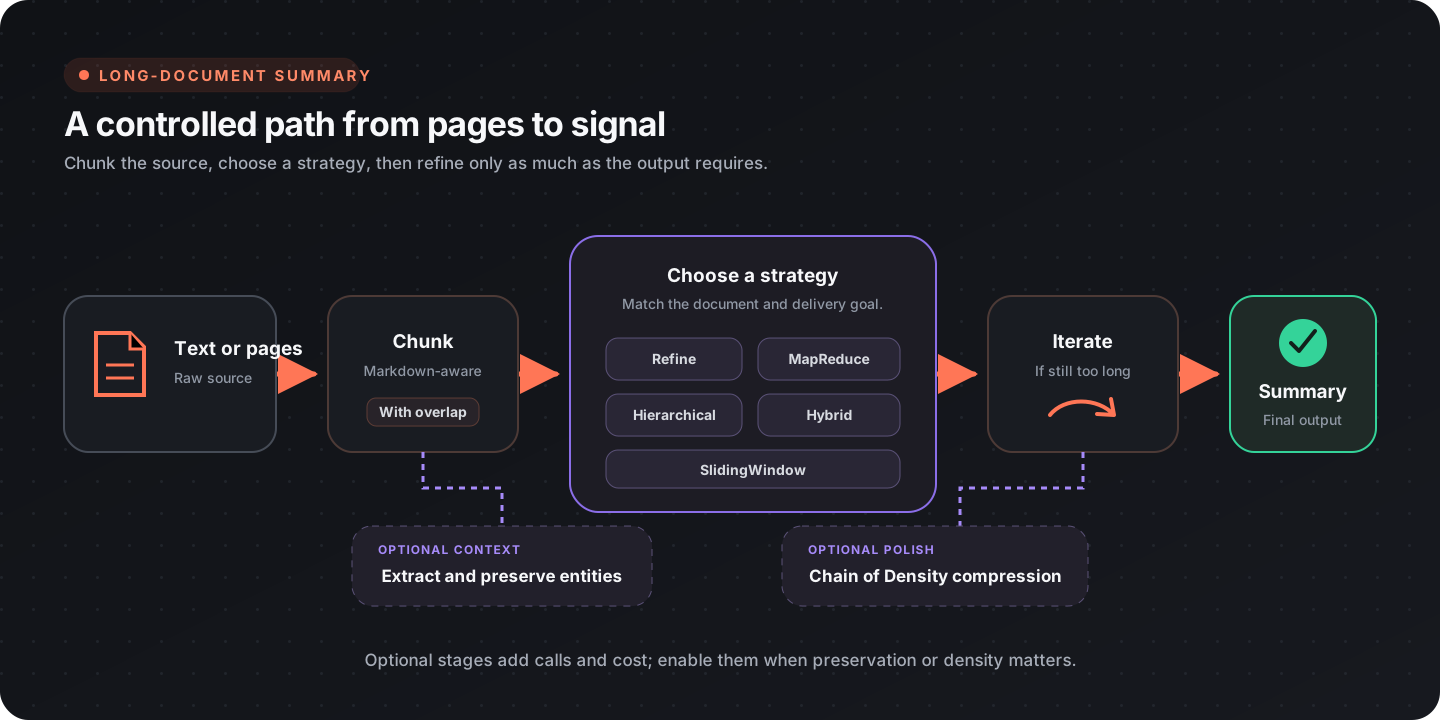
Section titled “How It Works”Long text is split into chunks, processed by the chosen strategy, and optionally post-processed with Chain of Density compression. The pipeline:
Strategy Comparison
Section titled “Strategy Comparison”| Strategy | Parallelism | Coherence | Structure-Aware | LLM Calls | Best For |
|---|---|---|---|---|---|
| Refine | None | ★★★★★ | No | N | Narratives, meeting notes |
| MapReduce | Full | ★★★ | No | N + reduce | Speed-critical, large docs |
| Hierarchical | Partial | ★★★★ | Yes | Sections + merges | Reports, papers with headings |
| Hybrid | Map phase | ★★★★ | No | N + K refine | Balance of speed & quality |
| SlidingWindow | None | Strongest on recent context | No | N + compressions | Very long or streaming inputs |
Refine
Section titled “Refine”Processes chunks sequentially. Each step receives the accumulated summary so far plus the next chunk, producing a rolling summary.
Pros:
- Strong narrative coherence because the model sees the accumulated summary
- Simple, predictable behavior
- Works well with small models
Cons:
- No parallelism — wall-clock time scales linearly with chunk count
- Later chunks may be under-represented as the summary grows
- Single point of failure if one chunk produces a bad summary
When to use: Documents where order matters (chronological reports, meeting transcripts, legal documents).
MapReduce
Section titled “MapReduce”Summarizes each chunk independently in parallel, then recursively merges the partial summaries.
Pros:
- Fastest strategy — map phase is fully parallelizable
- Scales well with concurrency setting
- Each chunk gets equal attention
Cons:
- Chunks are isolated during mapping — information spanning boundaries is lost
- Reduce phase may distort relative importance
- Requires more total LLM calls than Refine
When to use: Large documents with uniformly important content, speed-critical pipelines, high-concurrency environments.
Hierarchical
Section titled “Hierarchical”Detects document structure (markdown headings) and builds a summary tree. Sections are summarized independently, then merged level by level.
Pros:
- Respects the author’s original organization
- Produces section-level summaries as a byproduct
- Natural fit for technical documentation
Cons:
- Requires detectable headings — falls back to balanced tree if none found
- Deep hierarchies multiply LLM calls
- Less effective for unstructured text
When to use: Technical reports, academic papers, documentation with clear heading structure.
Hybrid
Section titled “Hybrid”Combines MapReduce (parallel map phase) with Refine (sequential polish over the map outputs).
Pros:
- Captures MapReduce speed for initial processing
- Refine pass restores narrative coherence
- Good trade-off for most real-world documents
Cons:
- Highest total LLM cost (map + refine)
- More complex failure modes
- Diminishing returns on very short documents
When to use: Large documents where you want both speed and a coherent final output.
SlidingWindow
Section titled “SlidingWindow”Maintains a fixed-size memory buffer that is compressed whenever it exceeds a budget. Each new chunk is integrated into the buffer, and a final synthesis pass produces the output.
Pros:
- Constant memory usage regardless of document length
- Handles arbitrarily long documents
- Good for streaming/real-time scenarios
Cons:
- Early content may be aggressively compressed and lose detail
- Recent chunks are over-represented in the final output
- Memory budget tuning affects quality significantly
When to use: Very long documents, streaming ingestion, and memory-constrained environments.
Chain of Density Post-Processing
Section titled “Chain of Density Post-Processing”After the main strategy produces a summary, Chain of Density (CoD) iteratively refines it to increase information density while maintaining the same length. Each step identifies 1–3 missing entities and rewrites the summary to include them.
Based on research by Adams et al. (2023), step 3 produces summaries closest to human preference:
| Step | Information Density | Readability | Recommendation |
|---|---|---|---|
| 1 | Low | Very easy | Casual overviews |
| 2 | Medium | Easy | General audiences |
| 3 | Optimal | Balanced | Default — most use cases |
| 4 | High | Moderate | Technical audiences |
| 5 | Very high | Dense | Maximum compression |
Tip: Evaluate CoD with the configured model before enabling it in production. Density revisions require the model to preserve facts while rewriting under a length constraint.
Entity Tracking
Section titled “Entity Tracking”When enabled, the engine extracts named entities (people, organizations, dates, technical terms) from a sample of chunks before summarization begins. These entities are injected as context into every LLM call.
Impact:
- Adds 2–3 extra LLM calls for extraction
- Significantly improves factual preservation, especially with MapReduce
- Extracted entities are available in the output for downstream use
Best paired with: MapReduce and Hybrid (where chunks are processed independently and most likely to lose cross-chunk entities).
Configuration Guide
Section titled “Configuration Guide”Chunk Size & Overlap
Section titled “Chunk Size & Overlap”| Setting | Default | Description |
|---|---|---|
| Chunk Size | 8000 chars | Maximum characters per chunk. Reduce for models with smaller context windows. |
| Chunk Overlap | 10% | Percentage of overlap between adjacent chunks (0–50%). Higher values prevent boundary information loss but increase total chunks. |
Rule of thumb: Set chunk size to roughly 60–70% of your model’s context window (in characters) to leave room for the system prompt and output.
Concurrency
Section titled “Concurrency”Controls parallel requests for MapReduce and Hybrid strategies.
| Value | Behavior |
|---|---|
| 0 | Unlimited — all chunks processed at once |
| 1 | Sequential (equivalent to disabling parallelism) |
| 4 | Default — good balance for most API rate limits |
Model Selection
Section titled “Model Selection”- Choose a model with enough context for the configured chunk, instructions, accumulated summary, and output.
- Evaluate factual preservation, coverage, and instruction following on representative documents.
- Use bounded concurrency that fits the provider’s rate limits.
- Treat Chain of Density and entity tracking as independent quality/cost choices and evaluate them with the selected model.
- The summarization strategies use text generation; tool use is not required.
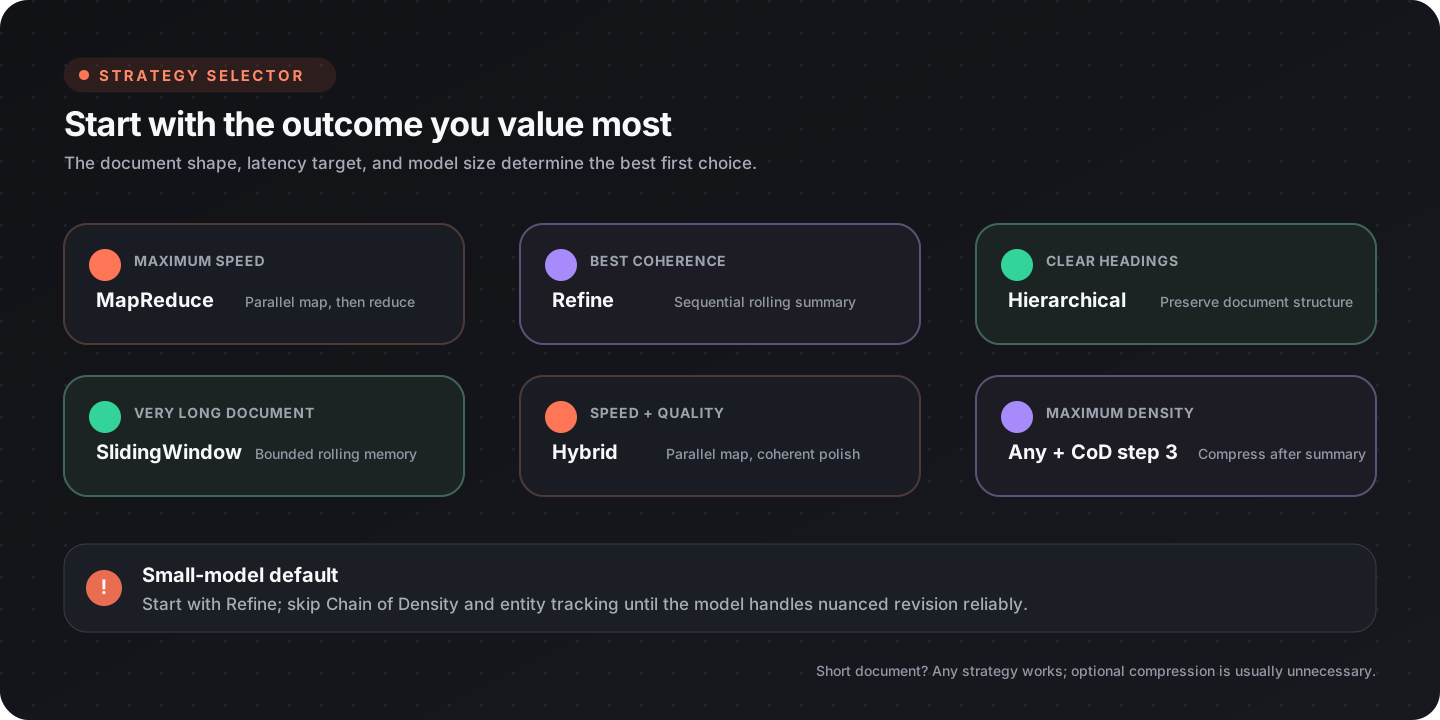
Quick Decision Tree
Section titled “Quick Decision Tree”