Shared & Remote Ontologies
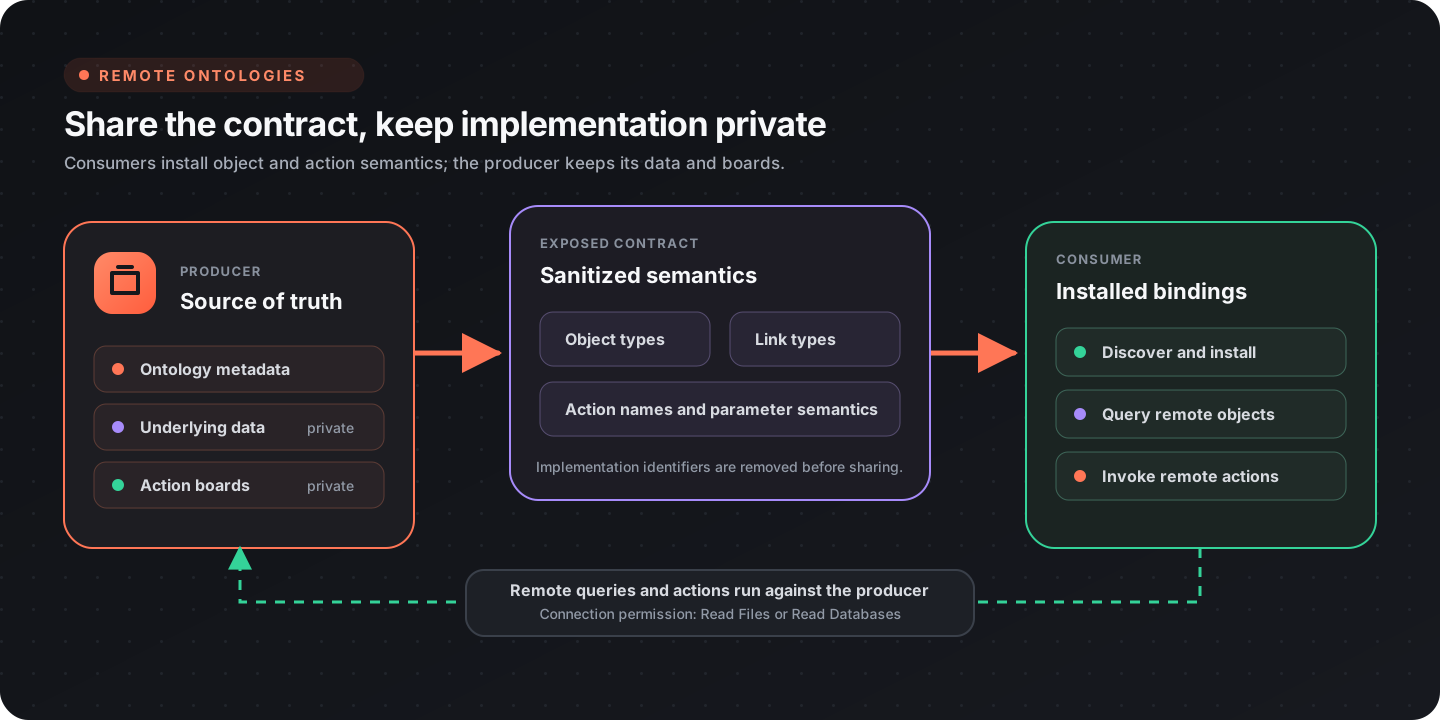
A remote ontology lets one project publish its semantic layer as a contract that other, connected projects can install and build on — without ever seeing the underlying data or the boards that implement its actions. This is how a shared, organization-wide ontology works: a producer owns the definition, and consumers subscribe to it.
Everything here is in Data Studio → Sharing.
The mental model
Section titled “The mental model”- A producer exposes an ontology. It stays the source of truth.
- A consumer installs a sanitized copy of the contract. It gets the object types and the semantics of actions — but not the producer’s private implementation (board IDs, versions, start nodes are stripped).
- When a consumer invokes a remote action, execution happens in the producer’s project, which resolves those opaque identifiers itself. The consumer never runs the producer’s board directly.
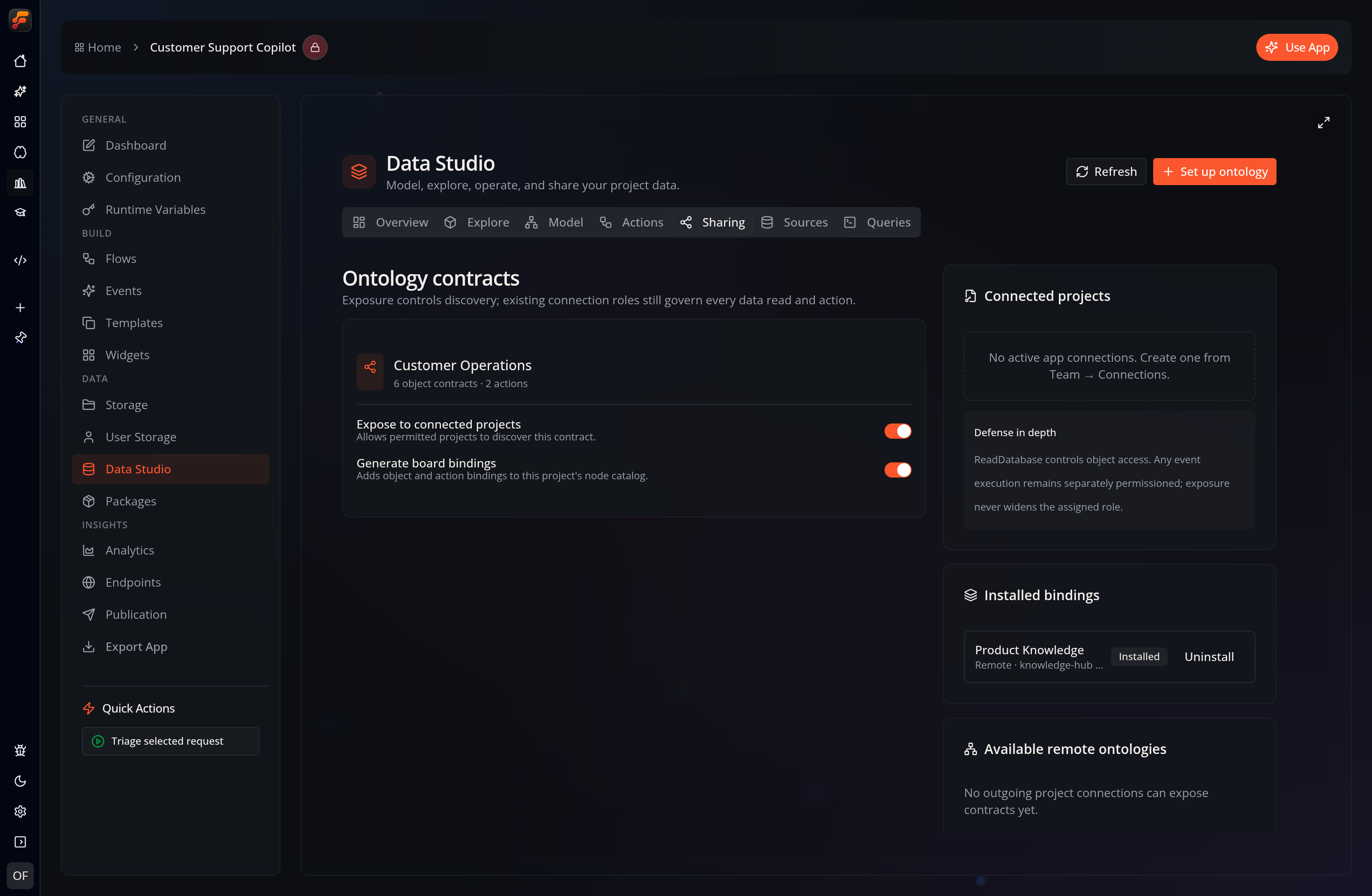
The Sharing tab shows both sides of that contract: the producer’s exposure and local-binding controls, plus any sanitized contracts already installed from other projects.
Prerequisites: connect the projects
Section titled “Prerequisites: connect the projects”Sharing rides on app connections. Before anything appears in the Sharing tab:
- Create an active connection from the consuming app to the producing app under Team → Connections.
- The consumer needs Read Boards in its own project to discover contracts.
- The connection’s role must grant Read Files or Read Databases on the producer. Without it, the producer’s contracts stay invisible even if exposed.
- Installing or refreshing a contract also requires Write Files or Write Databases in the consuming project.
If there are no active connections, the Sharing tab shows “No active app connections. Create one from Team → Connections.”
Producer side: expose an ontology
Section titled “Producer side: expose an ontology”On each of your ontologies in the Sharing tab there are two switches:
| Switch | Effect |
|---|---|
| Expose to connected projects | Makes this contract discoverable by permitted connected projects. |
| Generate board bindings | Adds this ontology’s object and action bindings to this project’s own node catalog. |
Turning Expose on is all a producer has to do. Consumers with a qualifying connection can then discover and install it.
Actions have their own Expose to connected projects switch. Only actions enabled for sharing are included in the sanitized remote contract; local-only actions stay private even when the ontology itself is exposed.
Consumer side: discover and install
Section titled “Consumer side: discover and install”The Available remote ontologies panel lists your active connections. For each one:
- Discover (or Refresh) — calls the connected project and lists the ontology contracts it exposes. Each shows its name and object-type count.
- Install — installs the sanitized contract into your project. Its status badge flips to Installed, and the contract’s object bindings are added to your node catalog.
An installed contract is labelled “bindings only” — a reminder that you receive object semantics and action definitions, never the producer’s boards.
Keeping in sync
Section titled “Keeping in sync”Each installed contract remembers the producer version it was captured from. Discover or Refresh compares that version with the current producer contract and can then show Update available. Updates are not pushed automatically. Refresh the contract to install the latest sanitized copy and regenerate its bindings.
Removing one
Section titled “Removing one”Uninstall removes the contract and its generated bindings from your project. Uninstall works even if the connection is no longer active, so you can always clean up a stale import.
Using remote data in Data Studio
Section titled “Using remote data in Data Studio”Installed contracts are first-class, read-only data sources:
- Explore lists their object types alongside local ontologies. Remote previews carry source provenance and open a read-only object inspector.
- Sources lists the object types supplied by each installed contract.
- Queries has a remote-ontology surface for SQL previews. Remote statements run against the producer and cannot be saved as consumer-side queries or views.
The local object sheet deliberately does not invoke remote actions. Use the generated Invoke Remote Ontology Action node so the producer can authorize and execute the governed operation.
Using a remote ontology in boards
Section titled “Using a remote ontology in boards”Once installed with bindings enabled, the remote ontology contributes nodes to your catalog:
- Query Remote Ontology Objects — read objects of a remote object type. This runs against the producer through your connection, honoring the producer’s exposure and connection role.
- Query Remote Ontology Children — expand a parent object’s containment children within the installed contract. Like the objects node, it runs against the producer and honors exposure.
- Invoke Remote Ontology Action — invoke the producer’s governed actions by object reference. The producer executes the pinned board version and enforces its own parameter schema and permissions.
Governance summary
Section titled “Governance summary”| Guarantee | How |
|---|---|
| Consumers see only what producers allow | Discovery returns exposed contracts only; the connection role must permit reading data |
| No implementation leaks | board_id, board_version, start_node_id, and event IDs are stripped from shared action contracts |
| No cross-ontology leaks | Containment link targets (dst_ontology, dst_binding_id) are stripped, so a remote subtree can’t resolve into a producer overlay that wasn’t exposed |
| Actions can’t be widened by editing metadata | Each action pins an immutable board version and a contract hash that’s re-checked at invoke time |
| Revocation is enforced at authorization | Turning off Expose stops new discovery and installs; existing consumers fail at the next workflow run or authorization check (authorization is cached only within a run) |
| Consumers can always clean up | Uninstall never requires the connection to still be active |
Related
Section titled “Related”- Ontology & Knowledge Graph — object types, link types, the graph explorer, and actions.